2017-07-03 19:04:27 +02:00
PHP Console Highlighter
=======================
Highlight PHP code in console (terminal).
Example
-------
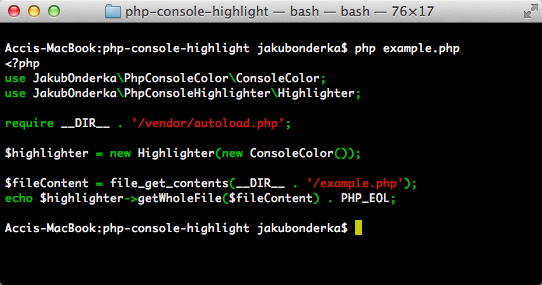
Install
-------
Just create a `composer.json` file and run the `php composer.phar install` command to install it:
```json
{
"require": {
"jakub-onderka/php-console-highlighter": "0.*"
}
}
```
Usage
-------
```php
< ?php
use JakubOnderka\PhpConsoleColor\ConsoleColor;
use JakubOnderka\PhpConsoleHighlighter\Highlighter;
require __DIR__ . '/vendor/autoload.php';
$highlighter = new Highlighter(new ConsoleColor());
$fileContent = file_get_contents(__FILE__);
echo $highlighter->getWholeFile($fileContent);
```
------
2020-01-17 10:58:01 +01:00
[](https://packagist.org/packages/jakub-onderka/php-console-highlighter)
2017-07-03 19:04:27 +02:00
[](https://travis-ci.org/JakubOnderka/PHP-Console-Highlighter)
2020-01-17 10:58:01 +01:00
[](https://packagist.org/packages/jakub-onderka/php-console-highlighter)
